# Users

<span class="TextRun SCXW227802730 BCX8" data-contrast="auto" lang="EN-US" xml:lang="EN-US"><span class="NormalTextRun SCXW227802730 BCX8">In the </span></span>**<span class="TextRun SCXW227802730 BCX8" data-contrast="auto" lang="EN-US" xml:lang="EN-US"><span class="NormalTextRun ContextualSpellingAndGrammarErrorV2Themed SCXW227802730 BCX8">u</span><span class="NormalTextRun ContextualSpellingAndGrammarErrorV2Themed SCXW227802730 BCX8">sers</span></span>**<span class="TextRun SCXW227802730 BCX8" data-contrast="auto" lang="EN-US" xml:lang="EN-US"><span class="NormalTextRun SCXW227802730 BCX8"> section, you can create, edit, and list system users.</span></span>

#### <span class="TextRun SCXW227802730 BCX8" data-contrast="auto" lang="EN-US" xml:lang="EN-US"><span class="NormalTextRun SCXW227802730 BCX8"><span class="TextRun SCXW21045627 BCX8" data-contrast="auto" lang="EN-US" xml:lang="EN-US"><span class="NormalTextRun SCXW21045627 BCX8">Creating</span></span><span class="TextRun SCXW21045627 BCX8" data-contrast="auto" lang="EN-US" xml:lang="EN-US"><span class="NormalTextRun SCXW21045627 BCX8"> users</span></span><span class="EOP SCXW21045627 BCX8" data-ccp-props="{"335559739":0}"> </span></span></span>

<span class="TextRun SCXW227802730 BCX8" data-contrast="auto" lang="EN-US" xml:lang="EN-US"><span class="NormalTextRun SCXW227802730 BCX8"><span class="EOP SCXW21045627 BCX8" data-ccp-props="{"335559739":0}"><span class="TextRun SCXW102972493 BCX8" data-contrast="auto" lang="EN-US" xml:lang="EN-US"><span class="NormalTextRun SCXW102972493 BCX8">There are two ways to create users in the system:</span></span><span class="EOP SCXW102972493 BCX8" data-ccp-props="{"335559739":0}"> </span></span></span></span>

1. <span class="TextRun SCXW227802730 BCX8" data-contrast="auto" lang="EN-US" xml:lang="EN-US"><span class="NormalTextRun SCXW227802730 BCX8"><span class="EOP SCXW21045627 BCX8" data-ccp-props="{"335559739":0}"><span class="EOP SCXW102972493 BCX8" data-ccp-props="{"335559739":0}"><span class="TextRun SCXW257821920 BCX8" data-contrast="auto" lang="EN-US" xml:lang="EN-US"><span class="NormalTextRun SCXW257821920 BCX8">Assign permissions to an existing employee:</span></span><span class="EOP SCXW257821920 BCX8" data-ccp-props="{"335559739":0}"> </span></span></span></span></span>
    - <span class="TextRun SCXW227802730 BCX8" data-contrast="auto" lang="EN-US" xml:lang="EN-US"><span class="NormalTextRun SCXW227802730 BCX8"><span class="EOP SCXW21045627 BCX8" data-ccp-props="{"335559739":0}"><span class="EOP SCXW102972493 BCX8" data-ccp-props="{"335559739":0}"><span class="EOP SCXW257821920 BCX8" data-ccp-props="{"335559739":0}"><span class="TextRun SCXW176709581 BCX8" data-contrast="auto" lang="EN-US" xml:lang="EN-US"><span class="NormalTextRun SCXW176709581 BCX8">Select the “+” icon next to the employee.</span></span><span class="EOP SCXW176709581 BCX8" data-ccp-props="{"335559739":0}"> </span></span></span></span></span></span>[![image.png](https://wiki.nexus33.com/uploads/images/gallery/2026-01/scaled-1680-/2mOimage.png)](https://wiki.nexus33.com/uploads/images/gallery/2026-01/2mOimage.png)
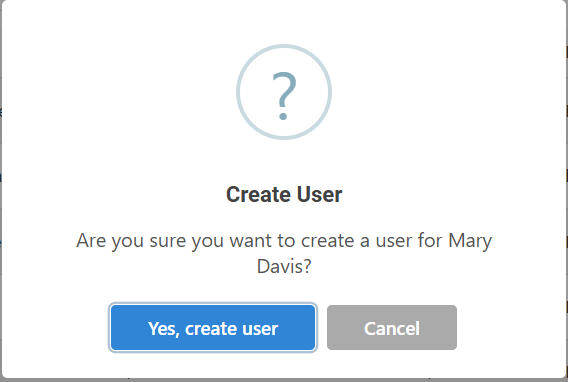
    - <span class="TextRun SCXW250099068 BCX8" data-contrast="auto" lang="EN-US" xml:lang="EN-US"><span class="NormalTextRun SCXW250099068 BCX8">A confirmation window will appear to </span><span class="NormalTextRun SCXW250099068 BCX8">validate</span><span class="NormalTextRun SCXW250099068 BCX8"> whether you want to convert that employee into a portal user.</span></span><span class="EOP SCXW250099068 BCX8" data-ccp-props="{"335559739":0}"> </span>[![image.png](https://wiki.nexus33.com/uploads/images/gallery/2026-01/scaled-1680-/0rOimage.png)](https://wiki.nexus33.com/uploads/images/gallery/2026-01/0rOimage.png)
    - <span class="TextRun SCXW178228495 BCX8" data-contrast="auto" lang="EN-US" xml:lang="EN-US"><span class="NormalTextRun SCXW178228495 BCX8">Once the credentials have been successfully created, a temporary password will be generated and sent to the user's registered email address.</span></span><span class="EOP SCXW178228495 BCX8" data-ccp-props="{"335559739":0}"> </span>[![image.png](https://wiki.nexus33.com/uploads/images/gallery/2026-01/scaled-1680-/ziFimage.png)](https://wiki.nexus33.com/uploads/images/gallery/2026-01/ziFimage.png)

#### <span class="TextRun SCXW59248392 BCX8" data-contrast="auto" lang="EN-US" xml:lang="EN-US"><span class="NormalTextRun SCXW59248392 BCX8">Creating multiple users</span></span>

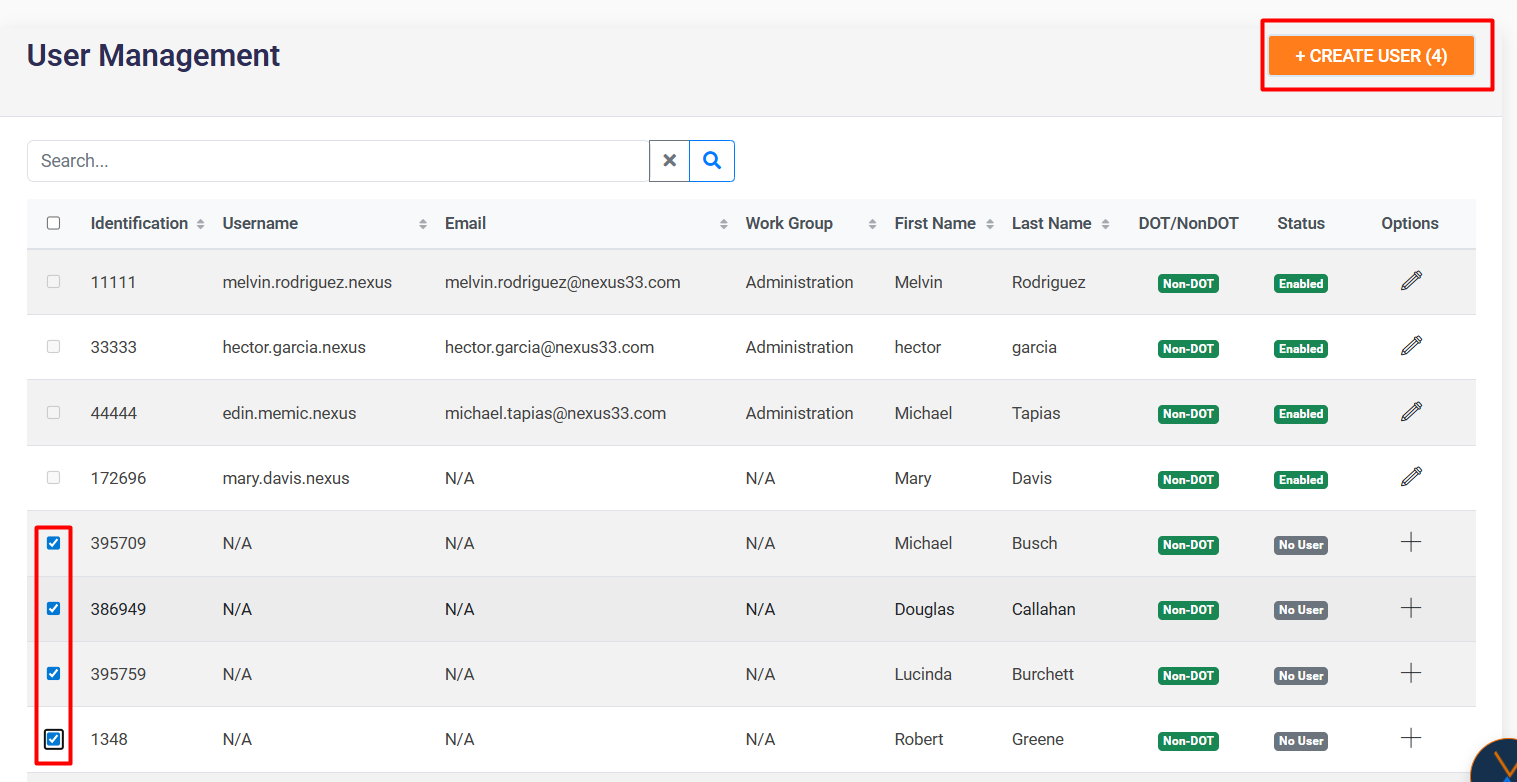
<span class="TextRun SCXW245720901 BCX8" data-contrast="auto" lang="EN-US" xml:lang="EN-US"><span class="NormalTextRun SCXW245720901 BCX8">Select several employees using the checkboxes and click on the “Create User” button to generate multiple users simultaneously.</span></span><span class="EOP SCXW245720901 BCX8" data-ccp-props="{"335559685":708,"335559739":0}"> </span>

[![image.png](https://wiki.nexus33.com/uploads/images/gallery/2026-01/scaled-1680-/L8pimage.png)](https://wiki.nexus33.com/uploads/images/gallery/2026-01/L8pimage.png)

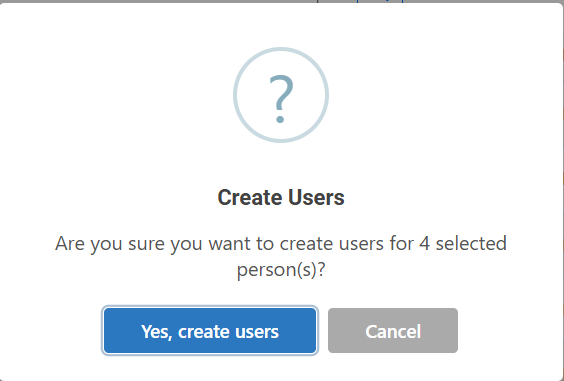
<span class="TextRun SCXW179001372 BCX8" data-contrast="auto" lang="EN-US" xml:lang="EN-US"><span class="NormalTextRun SCXW179001372 BCX8">A confirmation window will appear to </span><span class="NormalTextRun SCXW179001372 BCX8">validate</span><span class="NormalTextRun SCXW179001372 BCX8"> whether you want to convert the selected employees into users.</span></span><span class="EOP SCXW179001372 BCX8" data-ccp-props="{"335559685":708,"335559739":0}"> </span>

[![image.png](https://wiki.nexus33.com/uploads/images/gallery/2026-01/scaled-1680-/WT1image.png)](https://wiki.nexus33.com/uploads/images/gallery/2026-01/WT1image.png)

[![image.png](https://wiki.nexus33.com/uploads/images/gallery/2026-01/scaled-1680-/Ltzimage.png)](https://wiki.nexus33.com/uploads/images/gallery/2026-01/Ltzimage.png)

#### <span class="TextRun SCXW255639611 BCX8" data-contrast="auto" lang="EN-US" xml:lang="EN-US"><span class="NormalTextRun SCXW255639611 BCX8">Editing</span></span><span class="TextRun SCXW255639611 BCX8" data-contrast="auto" lang="EN-US" xml:lang="EN-US"><span class="NormalTextRun SCXW255639611 BCX8"> users</span></span><span class="EOP SCXW255639611 BCX8" data-ccp-props="{"335559739":0}"> </span>

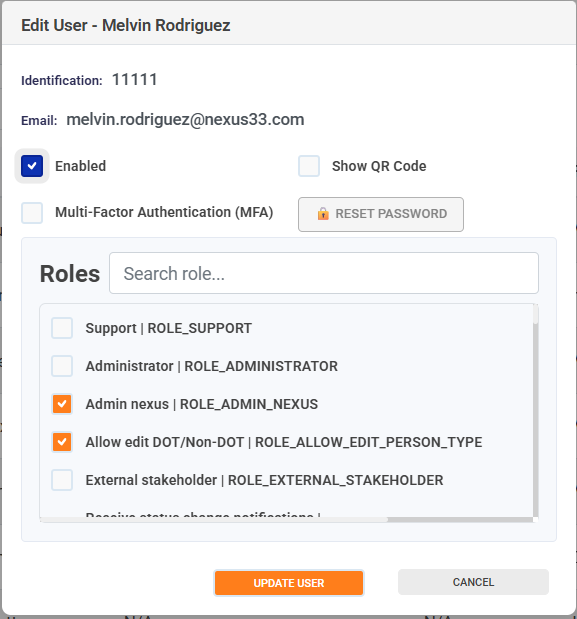
<span class="EOP SCXW255639611 BCX8" data-ccp-props="{"335559739":0}"><span class="TextRun SCXW45010023 BCX8" data-contrast="auto" lang="EN-US" xml:lang="EN-US"><span class="NormalTextRun SCXW45010023 BCX8">From the Edit option, you can:</span></span><span class="EOP SCXW45010023 BCX8" data-ccp-props="{"335559739":0}"> </span></span>

<div class="SCXW237560332 BCX8" id="bkmrk-enable-or-disable-a-"><div class="ListContainerWrapper SCXW237560332 BCX8">- <span class="TextRun SCXW237560332 BCX8" data-contrast="auto" lang="EN-US" xml:lang="EN-US"><span class="NormalTextRun SCXW237560332 BCX8">Enable or disable a user's </span></span><span class="TextRun SCXW237560332 BCX8" data-contrast="auto" lang="EN-US" xml:lang="EN-US"><span class="NormalTextRun SCXW237560332 BCX8">access</span></span><span class="TextRun SCXW237560332 BCX8" data-contrast="auto" lang="EN-US" xml:lang="EN-US"><span class="NormalTextRun SCXW237560332 BCX8"> to the portal.</span></span><span class="EOP SCXW237560332 BCX8" data-ccp-props="{"335559739":0}"> </span>

</div></div><div class="SCXW237560332 BCX8" id="bkmrk-enable-or-disable%C2%A0mu"><div class="ListContainerWrapper SCXW237560332 BCX8">- <span class="TextRun SCXW237560332 BCX8" data-contrast="auto" lang="EN-US" xml:lang="EN-US"><span class="NormalTextRun SCXW237560332 BCX8">Enable or disable </span></span><span class="TextRun SCXW237560332 BCX8" data-contrast="auto" lang="EN-US" xml:lang="EN-US"><span class="NormalTextRun SCXW237560332 BCX8">multi-factor authentication (MFA)</span></span><span class="TextRun SCXW237560332 BCX8" data-contrast="auto" lang="EN-US" xml:lang="EN-US"><span class="NormalTextRun SCXW237560332 BCX8">.</span></span><span class="EOP SCXW237560332 BCX8" data-ccp-props="{"335559739":0}"> </span>

</div></div><div class="SCXW237560332 BCX8" id="bkmrk-enable-or-disable%C2%A0sh"><div class="ListContainerWrapper SCXW237560332 BCX8">- <span class="TextRun SCXW237560332 BCX8" data-contrast="auto" lang="EN-US" xml:lang="EN-US"><span class="NormalTextRun SCXW237560332 BCX8">Enable or disable </span></span><span class="TextRun SCXW237560332 BCX8" data-contrast="auto" lang="EN-US" xml:lang="EN-US"><span class="NormalTextRun SCXW237560332 BCX8">Show QR</span></span><span class="TextRun SCXW237560332 BCX8" data-contrast="auto" lang="EN-US" xml:lang="EN-US"><span class="NormalTextRun SCXW237560332 BCX8"> to embed the two-factor authentication app.</span></span><span class="EOP SCXW237560332 BCX8" data-ccp-props="{"335559739":0}"> </span>

</div></div><div class="SCXW237560332 BCX8" id="bkmrk-configure-the%C2%A0roles%C2%A0"><div class="ListContainerWrapper SCXW237560332 BCX8">- <span class="TextRun SCXW237560332 BCX8" data-contrast="auto" lang="EN-US" xml:lang="EN-US"><span class="NormalTextRun SCXW237560332 BCX8">Configure the </span></span><span class="TextRun SCXW237560332 BCX8" data-contrast="auto" lang="EN-US" xml:lang="EN-US"><span class="NormalTextRun SCXW237560332 BCX8">roles</span></span><span class="TextRun SCXW237560332 BCX8" data-contrast="auto" lang="EN-US" xml:lang="EN-US"><span class="NormalTextRun SCXW237560332 BCX8"> associated with each user.</span></span><span class="EOP SCXW237560332 BCX8" data-ccp-props="{"335559739":0}"> </span>

</div></div><div class="SCXW237560332 BCX8" id="bkmrk-allows%C2%A0you-to%C2%A0reset-"><div class="ListContainerWrapper SCXW237560332 BCX8">- <span class="TextRun SCXW237560332 BCX8" data-contrast="auto" lang="EN-US" xml:lang="EN-US"><span class="NormalTextRun SCXW237560332 BCX8">Allows</span><span class="NormalTextRun SCXW237560332 BCX8"> you to </span></span><span class="TextRun SCXW237560332 BCX8" data-contrast="auto" lang="EN-US" xml:lang="EN-US"><span class="NormalTextRun SCXW237560332 BCX8">reset the password</span></span><span class="TextRun SCXW237560332 BCX8" data-contrast="auto" lang="EN-US" xml:lang="EN-US"><span class="NormalTextRun SCXW237560332 BCX8"> for portal users in case of forgotten or lost access.</span></span><span class="EOP SCXW237560332 BCX8" data-ccp-props="{"335559739":0}"> </span>[![image.png](https://wiki.nexus33.com/uploads/images/gallery/2026-01/scaled-1680-/Fosimage.png)](https://wiki.nexus33.com/uploads/images/gallery/2026-01/Fosimage.png)

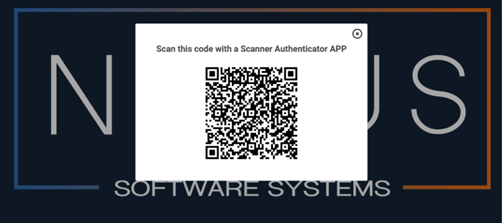
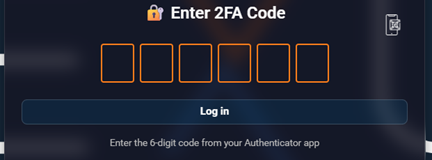
</div></div><p class="callout info"><span class="TextRun SCXW167112393 BCX8" data-contrast="auto" lang="ES-CO" xml:lang="ES-CO"><span class="NormalTextRun SCXW167112393 BCX8">📝</span></span><span class="TextRun SCXW167112393 BCX8" data-contrast="auto" lang="EN-US" xml:lang="EN-US"><span class="NormalTextRun SCXW167112393 BCX8"> </span></span><span class="TextRun SCXW167112393 BCX8" data-contrast="none" lang="EN-US" xml:lang="EN-US"><span class="NormalTextRun SCXW167112393 BCX8">Note</span></span><span class="TextRun SCXW167112393 BCX8" data-contrast="auto" lang="EN-US" xml:lang="EN-US"><span class="NormalTextRun SCXW167112393 BCX8">: If the user has never enabled </span></span><span class="TextRun SCXW167112393 BCX8" data-contrast="auto" lang="EN-US" xml:lang="EN-US"><span class="NormalTextRun SCXW167112393 BCX8">multi-factor authentication</span></span><span class="TextRun SCXW167112393 BCX8" data-contrast="auto" lang="EN-US" xml:lang="EN-US"><span class="NormalTextRun SCXW167112393 BCX8">, a QR code will be displayed when they log in for the first time, which they must scan with the </span><span class="NormalTextRun SCXW167112393 BCX8">Scanner</span><span class="NormalTextRun SCXW167112393 BCX8"> Authenticator </span><span class="NormalTextRun SCXW167112393 BCX8">app</span><span class="NormalTextRun SCXW167112393 BCX8">.</span></span><span class="EOP SCXW167112393 BCX8" data-ccp-props="{"335559739":0}"> </span></p>

[![image.png](https://wiki.nexus33.com/uploads/images/gallery/2026-01/scaled-1680-/vORimage.png)](https://wiki.nexus33.com/uploads/images/gallery/2026-01/vORimage.png)

<span style="mso-ansi-language: EN-US;">To view the **QR** code again, click on the cell phone icon </span><span lang="ES-CO" style="font-family: 'Segoe UI Emoji',sans-serif; mso-bidi-font-family: 'Segoe UI Emoji';">📱</span><span style="mso-ansi-language: EN-US;">.</span>

[![image.png](https://wiki.nexus33.com/uploads/images/gallery/2026-01/scaled-1680-/RhVimage.png)](https://wiki.nexus33.com/uploads/images/gallery/2026-01/RhVimage.png)

<span style="mso-ansi-language: EN-US;">If you lose or change your device, you can re-enable the “**Show QR Code**” option to reconfigure authentication with Google Authenticator.</span>

[![image.png](https://wiki.nexus33.com/uploads/images/gallery/2026-01/scaled-1680-/V2Vimage.png)](https://wiki.nexus33.com/uploads/images/gallery/2026-01/V2Vimage.png)

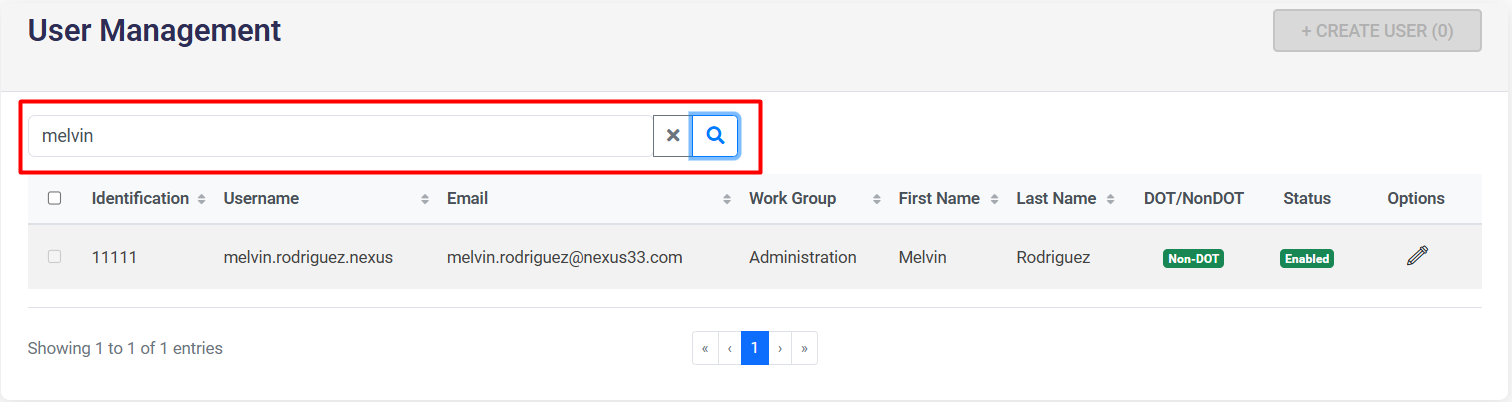
<span style="mso-ansi-language: EN-US;">To **search** for a user, click on the magnifying glass icon </span><span lang="ES-CO" style="font-family: 'Segoe UI Emoji',sans-serif; mso-bidi-font-family: 'Segoe UI Emoji';">🔍</span><span style="mso-ansi-language: EN-US;">, and to clear</span>

[![image.png](https://wiki.nexus33.com/uploads/images/gallery/2026-01/scaled-1680-/SrHimage.png)](https://wiki.nexus33.com/uploads/images/gallery/2026-01/SrHimage.png)